Thứ Sáu, 15 tháng 3, 2013

Csharp Remoting Tutorial

http://csharp.net-informations.com/remoting/csharp-remoting-tutorial.htm

Csharp Remoting Tutorial

SiteMap
CSharp.Net-Informations.com

The .NET Remoting provides an abstract approach to interprocess communication that separates the Remotable Object from a specific client or server application domain and from a specific mechanism of communication .The .NET Remoting supports Distributed Object communications over the TCP and HTTP transports by using Binary or SOAP representation of the data stream.

The .Net Remoting Framework provides a number of services, including activation and lifetime support, as well as communication channels responsible for transporting messages to and from remote applications.

The main three components of a Remoting Framework are :

1. C# Remotable Object

2. C# Remote Listener Application - (listening requests for Remote Object)

3. C# Remote Client Application - (makes requests for Remote Object)

From the following links you can see each components of .Net Remoting in detail.


C# XML Tutorial

http://csharp.net-informations.com/xml/csharp-xmltutorial.htm

C# XML Tutorial

SiteMap
CSharp.Net-Informations.com

XML is a self describing language and it gives the data as well as the rules to identify what information it contains. Like HTML , XML is a subset of SGML - Standard Generalized Markup Language. The following links give you more information about XML Files and its operations through C# Programming Language.


C# Graphical User Interface

http://csharp.net-informations.com/gui/gui_tutorial.htm
--   

C# Graphical User Interface

SiteMap
CSharp.Net-Informations.com

C# has all the features of any powerful, modern language. In C#, the most rapid and convenient way to create your user interface is to do so visually, using the Windows Forms Designer and Toolbox. Windows Forms controls are reusable components that encapsulate user interface functionality and are used in client side Windows based applications.

A control is a component on a form used to display information or accept user input. The Control class provides the base functionality for all controls that are displayed on a Form. From the following chapters you can see how to use these Windows Forms Controls in your C# applications.


C# Excel Tutorial

http://csharp.net-informations.com/excel/csharp-excel-tutorial.htm

C# Excel Tutorial

SiteMap
CSharp.Net-Informations.com

Automation of an Excel file allows us to doing various operations from C#. We can automate an Excel file from C# in two ways. Using Excel Object Model in one way and another way is using Microsoft Jet Engine to connect Excel from CSharp. Through the automation from C# we can achieve creating a new workbook, adding data to a workbook, creating charts etc.

From the following links you can see helpful resources about Excel automation from C#.


3 New Uses For Sub Reports by Jason Dove

http://csharp.net-informations.com/crystal-reports/crystal-reports-sub-reports-new-uses.htm

3 New Uses For Sub Reports by Jason Dove

SiteMap
CSharp.Net-Informations.com

Article By Jason Dove

Summary: Sub reports can kill a report's performance, but when used with a little imagination they can be a helpful tool in expanding Crystal Reports functionality in a way that cannot be realised by any other method.

3 New Uses For Sub Reports by Jason Dove

I hate sub reports and always consider them the last resort in any reporting solution. The negative effect on performance and maintainability is just not worth the easy ride they give the report writer. Nine times out of ten reporting requirements can be met using a little forethought and planning (and a solid understanding of formulas).

That said, there are a few novel ways of using sub reports which will not affect performance and actually prove a boon to the developer

1. Report Header

Any information, graphics, logos or special fields (Date report was run etc) which will appear in every report can be built into a sub report which is then added to the main report.

The performance hit is minimal, and a small amount is shaved off the development time, plus, it can go a long way to standardising your reports. But the real benefit comes when the business decides to update its logo or corporate color etc. As long as the sub report is set to "Re-import When Opening" (via the sub report's Format Editor), only one sub report needs to be changed to impact across the entire report library.

2. Reconciling Conflicting Groups

Often there is a requirement to show the same information summarised by logically conflicting groups. For example: showing the total sales for each week within a month and totals sales per team in a month.

A typical sub report can be used to load the data again then group it by the second value, and this is the typical way to use a sub report. But accessing the database again for data you have is a waste of resources which can be crippling with bigger reports.

The most efficient way to handle this is to load the information you want into one or more arrays and pass them through to the sub report to format and group as you want.

It is possible to display the array in the main report and forgo the need for a sub report at all, but if you are reporting against a lot of data there is a chance the report will finish before the array has been fully displayed.

3. Conditional Data Targets

I come across this issue quite often: a report is needed which always shows the same set of data, plus one of two (or more) other sets of data depending on the user's choice or the results returned from the first set of data.

Because a single report can only have one set of linked tables, multiple sub reports must be used.

For example: a sales report shows revenue for a particular office, if the office has met its target the managers want to see how they compare to the rest of the other offices, but if they fail to meet their target they want to see the sales broken down by each rep to identify any problem areas.

A report based on sales reps and one based on nation office sales require completely different tables. The most efficient way to solve this problem is to create a sub report for each. Whichever is not needed is suppressed and given Record Selection criteria which will return an empty report. The required sub report runs as normal.

Article By Jason Dove

5 Tests for Top Performance by Jason Dove

http://csharp.net-informations.com/crystal-reports/csharp-crystal-top-perfomance.htm

5 Tests for Top Performance by Jason Dove

SiteMap
CSharp.Net-Informations.com

Article By Jason Dove

Summary: How to improve the efficiency of any Crystal Report using one or more of the five steps in this article.

5 Tests for Top Performance

It is complete, your masterpiece report. Not only does it meet your customer's expectations, it blows them out the water, all they want is beautifully summarised and displayed in a myriad of ways.

Then

Disaster!

You try to run the report for a month against the live database and not the two days test data you used for development.

Suddenly your report's runtime goes from twenty seconds to two hours.

Every Crystal Reports developer has experienced this situation and it can be one of the most frustrating aspects of report design.

Thankfully there are a variety of things that can be done to combat bad performance, any one of which can reap huge benefits.

Here are the five most likely causes of poor performance and how to mitigate their effects.

1. The Database Set Up

This may or may not be within your direct control to alter, but databases are not set up ideally.

Two top contenders are:

a: The fields you are filtering on are not indexed. You can check whether or not this is the case by referring to the Linking Tab in the Database Expert window. Indexed fields have colored markers next to them.

I have personally seen reports run hundreds of times quicker due to the addition of an index being added to an important (to the report filter) field.

b: Using a view rather than a table to report from can be devastating to a report's performance. This is mainly due to views not having indexes. A view is a collection of tables (much like a basic report) and is often used to simplify data for end users.

The only way to avoid this is to report on the tables which make up the view. Identifying whether the source of a field is a table or a view can be done via the Database Expert as tables and views are listed separately.

Identifying which tables make up a view can be much trickier and you may need the help of the database documentation.

Also, when using Oracle databases, turning off the case sensitive option on queries can really speed up reporting times but may require existing reports to be rewritten.

2.Using the wrong ODBC driver.

ODBC drivers are how Crystal Reports attaches to the database. There is usually a variety of ODBC drivers which will work for any particular make of database and some are better than others.

The only way to really test this is to run the report with all the suitable ODBC drivers and see which is the most efficient.

Experience has taught me that the ODBC driver provided with the software associated to the database is usually the best option.

3.Excessive Use of Sub Reports

Each sub report is like another report accessing the database, and if that sub report is placed in the Detail Section it will run for EVERY record the main report loads. Even if placed in a Group Section the sub report will still be run numerous times.

Report Sections are usually the ideal place to home a sub report as they will only run once. But this still turns one report into two as far as performance is concerned.

The best way to negate the performance issue caused by sub reports is to not use them.

Ninety nine percent of sub reports are not necessary and the same result can be achieved using other methods through grouping, running totals and / or formulas.

4.Table Linking

Anything other than a Link Type of equals ('=') will cause a massive degradation in performance.

The Link Options window (accessible through right clicking on a specific link) will allow any values to be reset.

If there is a need for this time of link, the same result can be achieved through the Group Selection or through formatting (and hiding the unwanted records) once they are loaded into the report.

5. Record Selection

When code for the record selection is written correctly, Crystal Reports will pass all the logic to the database as SQL and only return the data needed.

If the record selection is not written in an SQL friendly way, Crystal Reports will bring back all the data and then filter it locally. This can be drastically slower than when calculated on the database.

Using the Record Selector Expert will guarantee that any filter created will be evaluated on the database and be as efficient as possible.

An additional point which can make a difference in some cases is when the report is scheduled to run. Heavy network traffic or database usage can impact a report's running time.

Working through the above points will enhance the efficiency of your slowly running reports. Building your reports with all this in mind from the beginning will save you redevelopment time later.

Article By Jason Dove

C# Crystal Reports from XML

http://csharp.net-informations.com/crystal-reports/csharp-xml-crystal-reports.htm

C# Crystal Reports from XML

SiteMap
CSharp.Net-Informations.com

Usually we are generating Crystal Reports from Databases , here in the following section describes how to create a Crystal reports from XML file in C#. This is very similar to creating Crystal Reports from database , the only difference is that you have to select the data source as the XML file at the designing time of Crystal Report in C#.

All C# Crystal Reports Tutorial in this website is based on the following database - crystaldb. So before you begin this section , please take a look at the database structure of crystaldb - Click Here C# crystaldb

If you are new to Crystal Reports and do not know how to create Crystal Reports from C# , please take a look at the section step by step tutorial for creating a Crystal Reports from C#.

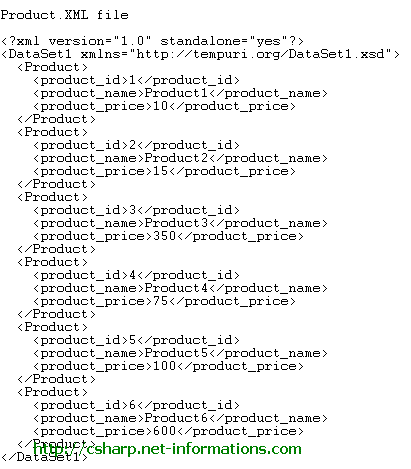
In order to generating Crystal Report from XML file , we have to create an XML file . Here we are going to create an XML file and name it as Product.XML . The structure of the Product.XML file is same as the Product table in the crystaldb database earlier mentioned in this section C# crystaldb . The content of the product.xml is shown below.

Download Product.XML

Generating Crystal Report from XML file is very similar to generating Crystal Report from Databases. The only difference is happened when you selecting the datasource part. Here you have to select Create New Connection - Database Files and select the XML file you want to generate Crystal Reports (In this case you select the Product.xml ).

Select all the fields from Product and click finish button

Now the designing part is over and the next step is to call the Crystal Reports in C# and view it in Crystal Reports Viewer control .

Select the default form (Form1.cs) you created in C# and drag a button and a CrystalReportViewer control to your form .

You have to include CrystalDecisions.CrystalReports.Engine in your C# Source Code.

using CrystalDecisions.CrystalReports.Engine;

using CrystalDecisions.Shared;

Copy and paste the following source code and run your C# project


using System;  using System.Windows.Forms;  using CrystalDecisions.CrystalReports.Engine;  using CrystalDecisions.Shared;    namespace WindowsApplication1  {      public partial class Form1 : Form      {          public Form1()          {              InitializeComponent();          }            private void button1_Click(object sender, EventArgs e)          {              ReportDocument cryRpt = new ReportDocument();              cryRpt.Load(PUT CRYSTAL REPORT PATH HERE\\CrystalReport1.rpt");              crystalReportViewer1.ReportSource = cryRpt;              crystalReportViewer1.Refresh();          }      }  }

NOTES:
cryRpt.Load(PUT CRYSTAL REPORT PATH HERE\\CrystalReport1.rpt");

The Crystal Reports file path in your C# project files location, there you can see CrystalReport1.rpt . So give the full path name of Crystal Reports file like c:\projects\crystalreports\CrystalReport1.rpt

(Chơi cho vui) AIRDROP CHAINGE FINANCE - dự án xây dựng ứng dụng ngân hàng số cho mọi người

 Không hiểu lắm về cái này, tuy nhiên thấy quảng cáo khá nhiều, lại chỉ cung cấp vài thông tin cá nhân (mà mấy ông lớn như facebook với goog...